
Gallery
Real Keyflow captures, with no stock artwork
The app screenshots here are rendered by Keyflow in CI with --snapshot in English and Tiếng Việt. Use the header switch to change those screenshots; the side-by-side preset comparison is a fixed English-language image.

The stage
What the GPU engine draws


The interface
Three concert interfaces and the design dock


The session
Choosing a score, practising, recording


All presets
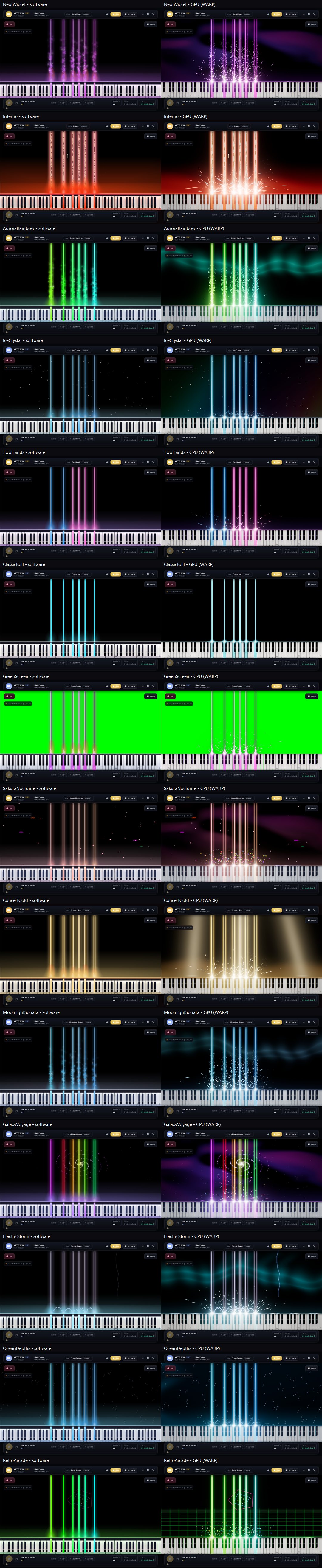
Fourteen looks, two engines, one picture
The CI pipeline renders every built-in preset twice — once with the software renderer and once with the GPU engine — and lays the results out in a single tall picture. It is the quickest way to compare looks, and the way the project proves the GPU stage kept each theme's intent.
- Neon Violet, Inferno, Aurora Rainbow, Ice Crystal, Two Hands, Classic Roll and Green Screen
- Sakura Nocturne, Concert Gold, Moonlight Sonata, Galaxy Voyage, Electric Storm, Ocean Depths and Retro Arcade
- Plus three community presets embedded in the build, labelled COMMUNITY in the list.
A preview of two preset comparisons; open the full image to see all fourteen
The whole sheet
In motion
One take, no editing
How these pictures are made
Keyflow can render its own interface: --snapshot draws a window off-screen and writes it out, --show-settings --settings-tab=… opens straight on a dock page, --play-chord holds a chord so the stage is not empty, and --lang=vi renders the whole interface in Vietnamese for that one run without touching your settings.
CI renders on WARP — Windows' own software rasterizer — so the pictures are reproducible on a runner with no graphics card, and they are re-rendered whenever the interface changes.
Your stage will look like this
Free and MIT licensed. Every app screenshot in this gallery shows the real interface — not stock artwork.